The website is ready to build. The client's files are not.
A small agency runs several sites at once, and every one of them stalls the same way: waiting on a logo, a paragraph of copy, or a password nobody wants to type into an email.
Problem
You have four or five projects live at any time, and each one needs roughly the same things: logo, brand colors, homepage copy, opening hours, maybe an existing CMS login. None of that is hard to get in principle. In practice it's scattered across three inboxes, a shared Drive folder someone forgot to permission correctly, and a WhatsApp thread with a photo of a business card.
A project manager ends up doing the same unpaid work on every project:
- Writing out the same list of "what we need from you" for the third time this month, because nobody kept last time's version.
- Following up manually — the second email, then the "just checking in," then the slightly less patient one.
- Chasing down a WordPress admin password that arrived as plain text in an email, sitting there for anyone with inbox access to find.
- Re-asking for a file because the client sent a 200px logo, a Word doc instead of a PDF, or nothing at all.
None of this is billable. All of it delays the actual work.
Workflow
- Define the item list once per project type. Build a standard "website" intake — logo, brand colors, hero copy, opening hours, existing site login — and save it as a template from the dashboard. Do the same for an e-shop project: product photos, descriptions, payment provider keys, shipping rules.
- Start a new project by sending the template. Point a new intake at the saved template and swap in the client's name and email; item-by-item redefinition is over.
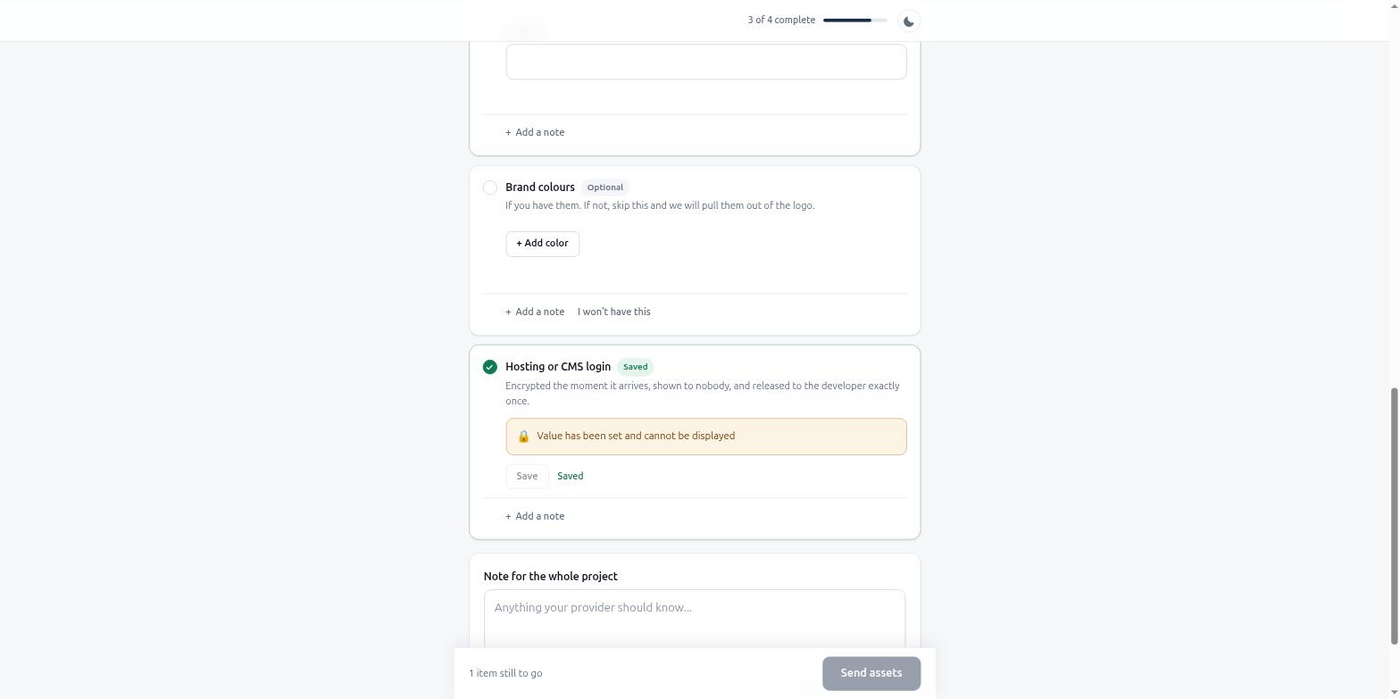
- The client gets one link, not a checklist by email. They land in a branded portal — your name, your colors — with a progress bar and no account to create.
- BriefGate chases automatically. The default schedule reminds at day 2, 5, and 9, then weekly, inside working hours, and stops after a handful of attempts instead of nagging forever.
- Credentials go in as
secretitems, not as plaintext in an inbox — sealed on the server and revealed to your team exactly once. - Results land where the build happens. Pull typed data and signed file links straight into the project once the client is done, or as each item is approved.
MCP example
A project manager (or the coding agent building the site) starts a new engagement from the standard website template, adding one item specific to this client — a login for the site they're migrating from:
{
  "project_name": "Riverside Dental — Website",
  "client": {
    "name": "Anna Novak",
    "email": "anna@riversidedental.com"
  },
  "template": "web-project-standard",
  "items": [
    {
      "key": "cms_credentials",
      "label": "Current hosting/CMS login (if migrating)",
      "type": "secret",
      "required": false
    }
  ],
  "chase_schedule": "default"
}
Every other item — logo, brand colors, hero copy, opening hours — comes from the template, so nobody retypes the same list for the fifth client this quarter. Once the client submits, get_intake_results returns files as signed URLs ready to fetch, plain text and structured fields as their typed values, and the CMS login decrypted exactly once — after that, calling it again returns null with a note that it was already revealed, so store it the moment it comes in.
Secret items and saved templates need the Solo plan or higher; the rest of this intake works on Free.
Result
The item list gets defined once per project type, not once per client. Reminders go out on schedule without a PM writing "just following up" for the tenth time. Credentials stop living in email threads. When a client finally submits, everything the build needs is already typed and in one place, so the team picks up the project instead of waiting on a reply that may or may not include the right file.
Start free — one active intake, no card required — and see whether your next project starts with files instead of a follow-up email.
Free tier, no card required.
Reference and comparisons for this workflow.